Salary Records
The Salary Records section helps you track the salary history of resources, including changes in salary amounts and tax deductions over time. This section also allows you to generate detailed reports for tax purposes or specific periods.
View Resource Salary History
Purpose
Track the complete salary history of a resource, including periods of salary adjustments.
Features
- Each record includes:
- Salary Amount: The salary paid during a specific period.
- Start Date: The date the salary period began.
- End Date: The date the salary period ended.
Steps
- Navigate to the Salary Records section.
- Select a resource to view their salary history.
- You will see a list of salary records displayed with start and end dates for each salary adjustment.
Generate WHT (Withholding Tax) CSV
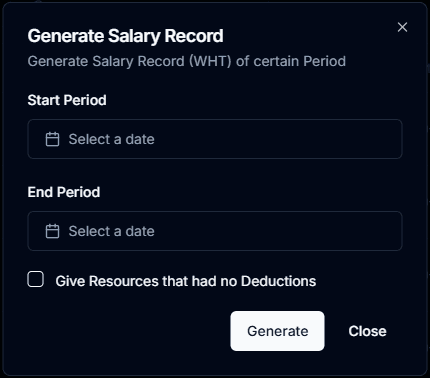
Purpose
Export a CSV file containing details of tax deductions for resources during a specific period.
Steps
- Navigate to the Salary Records section.
- Click the Generate WHT CSV button.
- Enter the Start Period and End Period for which you want to calculate tax deductions.
- Click Generate.
- The downloaded CSV will include:
- Resource names
- Tax deducted for the period
- Total salary before and after tax
Export Non-Deduction Data
Purpose
Download a CSV file containing details of resources who had no tax deductions during a specified period.
Steps
- Navigate to the Salary Records section.
- Click the Export Non-Deduction Data button.
- Enter the Start Period and End Period for which you want to check non-deductions.
- Check the checkbox mentioned “Give Resources that had no Deductions”
- Click Generate.
- The CSV file will include:
- Resource names
- Total salary amounts
- Confirmation of no tax deductions